触发器插件
Note: ⚠️ 本文档由 AI 自动翻译。如有任何不准确之处,请参考英文原版。
什么是触发器插件?
触发器是 FlexAI v1.10.0 版本中引入的一种新型起始节点。与代码、工具或知识库检索等功能节点不同,触发器的目的是将第三方事件转换为 FlexAI 可以识别和处理的输入格式。
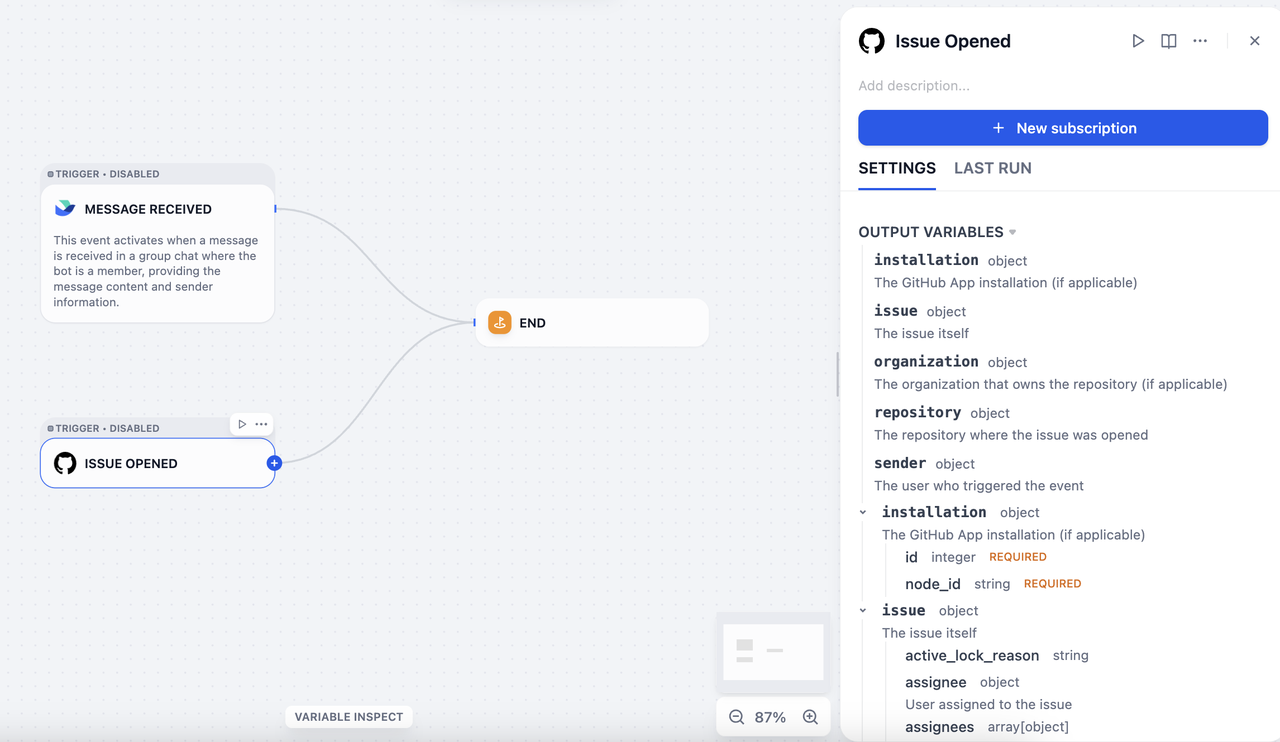
例如,如果你在 Gmail 中将 FlexAI 配置为 new email 事件接收器,每当收到新邮件时,Gmail 会自动向 FlexAI 发送一个可用于触发工作流的事件。然而:
-
Gmail 的原始事件格式与 FlexAI 的输入格式不兼容。
-
全球有数千个平台,每个平台都有其独特的事件格式。
因此,我们需要触发器插件来定义和解析来自不同平台、各种格式的事件,并将它们统一为 FlexAI 可以接受的输入格式。
技术概述
FlexAI 触发器基于 webhook 实现,这是一种在网络上被广泛采用的机制。许多主流 SaaS 平台(如 GitHub、Slack 和 Linear)都支持 webhook,并提供完善的开发者文档。
Webhook 可以理解为一种基于 HTTP 的事件分发器。一旦配置了事件接收地址,这些 SaaS 平台会在订阅的事件发生时自动将事件数据推送到目标服务器。
为了以统一的方式处理来自不同平台的 webhook 事件,FlexAI 定义了两个核心概念:订阅(Subscription)和事件(Event)。
-
订阅(Subscription):基于 Webhook 的事件分发需要在第三方平台的开发者控制台中将 FlexAI 的网络地址注册为目标服务器。在 FlexAI 中,这个配置过程称为订阅。
-
事件(Event):一个平台可能发送多种类型的事件——例如收到邮件、删除邮件或标记邮件为已读——所有这些都会推送到注册的地址。触发器插件可以处理多种事件类型,每个事件对应 FlexAI 工作流中的一个插件触发器节点。
插件开发
触发器插件的开发流程与其他插件类型(工具、数据源、模型等)一致。
你可以使用 flexai plugin init 命令创建开发模板。生成的文件结构遵循标准的插件格式规范。
├── _assets
│   └── icon.svg
├── events
│   └── star
│       ├── star_created.py
│       └── star_created.yaml
├── main.py
├── manifest.yaml
├── provider
│   ├── github.py
│   └── github.yaml
├── README.md
├── PRIVACY.md
└── requirements.txt
-
manifest.yaml:描述插件的基本元数据。 -
provider目录:包含提供者的元数据、创建订阅的代码,以及接收 webhook 请求后对事件进行分类的代码。 -
events目录:包含事件处理和过滤的代码,支持在节点级别进行本地事件过滤。你可以创建子目录来分组相关事件。
Note:
对于触发器插件,FlexAI 最低版本必须设置为 `1.10.0`,SDK 版本必须 `>= 0.6.0`。
接下来,我们将以 GitHub 为例来说明触发器插件的开发流程。
创建订阅
主流 SaaS 平台的 Webhook 配置方式差异很大:
-
一些平台(如 GitHub)支持基于 API 的 webhook 配置。对于这些平台,一旦完成 OAuth 认证,FlexAI 可以自动设置 webhook。
-
其他平台(如 Notion)不提供 webhook 配置 API,可能需要用户手动进行认证。
为了适应这些差异,我们将订阅过程分为两部分:订阅构造器(Subscription Constructor)和订阅(Subscription)本身。
对于像 Notion 这样的平台,创建订阅需要用户手动复制 FlexAI 提供的回调 URL,并将其粘贴到他们的 Notion 工作区以完成 webhook 设置。这个过程对应 FlexAI 界面中的粘贴 URL 创建新订阅选项。
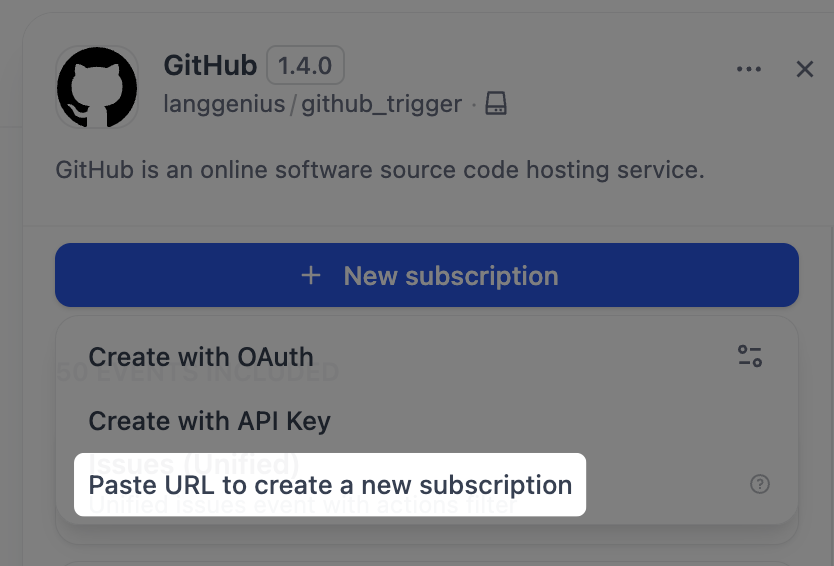
要实现通过手动粘贴 URL 创建订阅,你需要修改两个文件:github.yaml 和 github.py。
github.yaml:
    由于 GitHub webhook 使用加密机制,需要一个密钥来解密和验证传入的请求。因此,你需要在 `github.yaml` 中声明 `webhook_secret`。

    ```yaml
    subscription_schema:
    - name: "webhook_secret"
      type: "secret-input"
      required: false
      label:
        zh_Hans: "Webhook Secret"
        en_US: "Webhook Secret"
        ja_JP: "Webhookシークレット"
      help:
        en_US: "Optional webhook secret for validating GitHub webhook requests"
        ja_JP: "GitHub Webhookリクエストの検証用のオプションのWebhookシークレット"
        zh_Hans: "可选的用于验证 GitHub webhook 请求的 webhook 密钥"
    ```
github.py:
   首先,我们需要实现 `dispatch_event` 接口。所有发送到回调 URL 的请求都由这个接口处理,处理后的事件将显示在**请求日志**部分,用于调试和验证。

    <img src="/images/trigger_plugin_manual_webhook_setup_config.PNG" alt="手动设置" width="500" />

   在代码中,你可以通过 `subscription.properties` 获取在 `github.yaml` 中声明的 `webhook_secret`。

   `dispatch_event` 方法需要根据请求内容确定事件类型。在下面的示例中,事件提取由 `_dispatch_trigger_event` 方法处理。
Tip:
完整代码示例,请参阅 [FlexAI 的 GitHub 触发器插件](https://github.com/flexai/flexai-plugin-sdks/tree/feat/trigger/python/examples/github_trigger)。
    ```python
    class GithubTrigger(Trigger):
        """Handle GitHub webhook event dispatch."""

        def _dispatch_event(self, subscription: Subscription, request: Request) -> EventDispatch:
            webhook_secret = subscription.properties.get("webhook_secret")
            if webhook_secret:
                self._validate_signature(request=request, webhook_secret=webhook_secret)

            event_type: str | None = request.headers.get("X-GitHub-Event")
            if not event_type:
                raise TriggerDispatchError("Missing GitHub event type header")

            payload: Mapping[str, Any] = self._validate_payload(request)
            response = Response(response='{"status": "ok"}', status=200, mimetype="application/json")
            event: str = self._dispatch_trigger_event(event_type=event_type, payload=payload)
            return EventDispatch(events=[event] if event else [], response=response)
    ```
事件处理
一旦提取了事件,相应的实现必须过滤原始 HTTP 请求并将其转换为 FlexAI 工作流可以接受的输入格式。
以 Issue 事件为例,你可以分别通过 events/issues/issues.yaml 和 events/issues/issues.py 定义事件及其实现。事件的输出可以在 issues.yaml 的 output_schema 部分定义,它遵循与工具插件相同的 JSON Schema 规范。
issues.yaml:
    ```yaml
    identity:
      name: issues
      author: langgenius
      label:
        en_US: Issues
        zh_Hans: 议题
        ja_JP: イシュー
    description:
      en_US: Unified issues event with actions filter
      zh_Hans: 带 actions 过滤的统一 issues 事件
      ja_JP: アクションフィルタ付きの統合イシューイベント
    output_schema:
      type: object
      properties:
        action:
          type: string
        issue:
          type: object
          description: The issue itself
    extra:
      python:
        source: events/issues/issues.py
    ```
issues.py:
    ```python
    from collections.abc import Mapping
    from typing import Any

    from werkzeug import Request

    from flexai_plugin.entities.trigger import Variables
    from flexai_plugin.errors.trigger import EventIgnoreError
    from flexai_plugin.interfaces.trigger import Event

    class IssuesUnifiedEvent(Event):
        """Unified Issues event. Filters by actions and common issue attributes."""

        def _on_event(self, request: Request, parameters: Mapping[str, Any], payload: Mapping[str, Any]) -> Variables:
            payload = request.get_json()
            if not payload:
                raise ValueError("No payload received")

            allowed_actions = parameters.get("actions") or []
            action = payload.get("action")
            if allowed_actions and action not in allowed_actions:
                raise EventIgnoreError()

            issue = payload.get("issue")
            if not isinstance(issue, Mapping):
                raise ValueError("No issue in payload")

            return Variables(variables={**payload})
    ```
事件过滤
要过滤掉某些事件——例如,只关注具有特定标签的 Issue 事件——你可以在 issues.yaml 的事件定义中添加 parameters。然后,在 _on_event 方法中,你可以抛出 EventIgnoreError 异常来过滤掉不符合配置条件的事件。
issues.yaml:
    ```yaml
    parameters:
    - name: added_label
      label:
        en_US: Added Label
        zh_Hans: 添加的标签
        ja_JP: 追加されたラベル
      type: string
      required: false
      description:
        en_US: "Only trigger if these specific labels were added (e.g., critical, priority-high, security, comma-separated). Leave empty to trigger for any label addition."
        zh_Hans: "仅当添加了这些特定标签时触发(例如:critical, priority-high, security,逗号分隔)。留空则对任何标签添加触发。"
        ja_JP: "これらの特定のラベルが追加された場合のみトリガー(例: critical, priority-high, security,カンマ区切り)。空の場合は任意のラベル追加でトリガー。"
    ```
issues.py:
    ```python
    def _check_added_label(self, payload: Mapping[str, Any], added_label_param: str | None) -> None:
        """Check if the added label matches the allowed labels"""
        if not added_label_param:
            return

        allowed_labels = [label.strip() for label in added_label_param.split(",") if label.strip()]
        if not allowed_labels:
            return

        # The payload contains the label that was added
        label = payload.get("label", {})
        label_name = label.get("name", "")

        if label_name not in allowed_labels:
            raise EventIgnoreError()

    def _on_event(self, request: Request, parameters: Mapping[str, Any], payload: Mapping[str, Any]) -> Variables:
        # ...
        # Apply all filters
        self._check_added_label(payload, parameters.get("added_label"))

        return Variables(variables={**payload})
    ```
通过 OAuth 或 API 密钥创建订阅
要启用通过 OAuth 或 API 密钥自动创建订阅,你需要修改 github.yaml 和 github.py 文件。
github.yaml:
    在 `github.yaml` 中,添加以下字段。

    ```yaml
    subscription_constructor:
      parameters:
      - name: "repository"
        label:
          en_US: "Repository"
          zh_Hans: "仓库"
          ja_JP: "リポジトリ"
        type: "dynamic-select"
        required: true
        placeholder:
          en_US: "owner/repo"
          zh_Hans: "owner/repo"
          ja_JP: "owner/repo"
        help:
          en_US: "GitHub repository in format owner/repo (e.g., microsoft/vscode)"
          zh_Hans: "GitHub 仓库,格式为 owner/repo(例如:microsoft/vscode)"
          ja_JP: "GitHubリポジトリは owner/repo 形式で入力してください(例: microsoft/vscode)"
      credentials_schema:
        access_tokens:
          help:
            en_US: Get your Access Tokens from GitHub
            ja_JP: GitHub からアクセストークンを取得してください
            zh_Hans: 从 GitHub 获取您的 Access Tokens
          label:
            en_US: Access Tokens
            ja_JP: アクセストークン
            zh_Hans: Access Tokens
          placeholder:
            en_US: Please input your GitHub Access Tokens
            ja_JP: GitHub のアクセストークンを入力してください
            zh_Hans: 请输入你的 GitHub Access Tokens
          required: true
          type: secret-input
          url: https://github.com/settings/tokens?type=beta
      extra:
        python:
          source: provider/github.py
    ```

    `subscription_constructor` 是 FlexAI 抽象出来的一个概念,用于定义如何构造订阅。它包含以下字段:

    - `parameters`(可选):定义创建订阅所需的参数,例如要订阅的事件类型或目标 GitHub 仓库

    - `credentials_schema`(可选):声明使用 API 密钥或访问令牌创建订阅所需的凭据,例如 GitHub 的 `access_tokens`。

    - `oauth_schema`(可选):实现通过 OAuth 创建订阅时需要。有关如何定义它的详细信息,请参阅[为你的工具插件添加 OAuth 支持](/zh/develop-plugin/dev-guides-and-walkthroughs/tool-oauth)。
github.py:
     在 `github.py` 中,创建一个 `Constructor` 类来实现自动订阅逻辑。

    ```python
    class GithubSubscriptionConstructor(TriggerSubscriptionConstructor):
        """Manage GitHub trigger subscriptions."""
        def _validate_api_key(self, credentials: Mapping[str, Any]) -> None:
            # ...

        def _create_subscription(
            self,
            endpoint: str,
            parameters: Mapping[str, Any],
            credentials: Mapping[str, Any],
            credential_type: CredentialType,
        ) -> Subscription:
            repository = parameters.get("repository")
            if not repository:
                raise ValueError("repository is required (format: owner/repo)")

            try:
                owner, repo = repository.split("/")
            except ValueError:
                raise ValueError("repository must be in format 'owner/repo'") from None

            events: list[str] = parameters.get("events", [])
            webhook_secret = uuid.uuid4().hex
            url = f"https://api.github.com/repos/{owner}/{repo}/hooks"
            headers = {
                "Authorization": f"Bearer {credentials.get('access_tokens')}",
                "Accept": "application/vnd.github+json",
            }

            webhook_data = {
                "name": "web",
                "active": True,
                "events": events,
                "config": {"url": endpoint, "content_type": "json", "insecure_ssl": "0", "secret": webhook_secret},
            }

            try:
                response = requests.post(url, json=webhook_data, headers=headers, timeout=10)
            except requests.RequestException as exc:
                raise SubscriptionError(f"Network error while creating webhook: {exc}", error_code="NETWORK_ERROR") from exc

            if response.status_code == 201:
                webhook = response.json()
                return Subscription(
                    expires_at=int(time.time()) + self._WEBHOOK_TTL,
                    endpoint=endpoint,
                    parameters=parameters,
                    properties={
                        "external_id": str(webhook["id"]),
                        "repository": repository,
                        "events": events,
                        "webhook_secret": webhook_secret,
                        "active": webhook.get("active", True),
                    },
                )

            response_data: dict[str, Any] = response.json() if response.content else {}
            error_msg = response_data.get("message", "Unknown error")
            error_details = response_data.get("errors", [])
            detailed_error = f"Failed to create GitHub webhook: {error_msg}"
            if error_details:
                detailed_error += f" Details: {error_details}"

            raise SubscriptionError(
                detailed_error,
                error_code="WEBHOOK_CREATION_FAILED",
                external_response=response_data,
            )
    ```
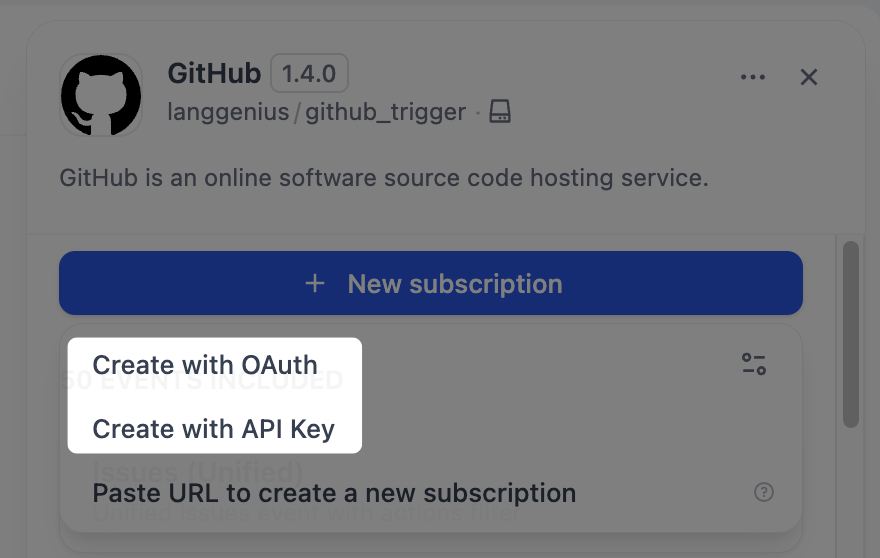
修改完这两个文件后,你将在 FlexAI 界面中看到使用 API 密钥创建选项。
通过 OAuth 自动创建订阅也可以在同一个 Constructor 类中实现:通过在 subscription_constructor 下添加 oauth_schema 字段,即可启用 OAuth 认证。
深入探索
触发器插件开发中核心类的接口定义和实现方法如下。
Trigger
class Trigger(ABC):
    @abstractmethod
    def _dispatch_event(self, subscription: Subscription, request: Request) -> EventDispatch:
        """
        Internal method to implement event dispatch logic.

        Subclasses must override this method to handle incoming webhook events.

        Implementation checklist:
        1. Validate the webhook request:
           - Check signature/HMAC using properties when you create the subscription from subscription.properties
           - Verify request is from expected source
        2. Extract event information:
           - Parse event type from headers or body
           - Extract relevant payload data
        3. Return EventDispatch with:
           - events: List of Event names to invoke (can be single or multiple)
           - response: Appropriate HTTP response for the webhook

        Args:
            subscription: The Subscription object with endpoint and properties fields
            request: Incoming webhook HTTP request

        Returns:
            EventDispatch: Event dispatch routing information

        Raises:
            TriggerValidationError: For security validation failures
            TriggerDispatchError: For parsing or routing errors
        """
        raise NotImplementedError("This plugin should implement `_dispatch_event` method to enable event dispatch")
TriggerSubscriptionConstructor
class TriggerSubscriptionConstructor(ABC, OAuthProviderProtocol):
    # OPTIONAL
    def _validate_api_key(self, credentials: Mapping[str, Any]) -> None:
        raise NotImplementedError(
            "This plugin should implement `_validate_api_key` method to enable credentials validation"
        )

    # OPTIONAL
    def _oauth_get_authorization_url(self, redirect_uri: str, system_credentials: Mapping[str, Any]) -> str:
        raise NotImplementedError(
            "The trigger you are using does not support OAuth, please implement `_oauth_get_authorization_url` method"
        )

    # OPTIONAL
    def _oauth_get_credentials(
        self, redirect_uri: str, system_credentials: Mapping[str, Any], request: Request
    ) -> TriggerOAuthCredentials:
        raise NotImplementedError(
            "The trigger you are using does not support OAuth, please implement `_oauth_get_credentials` method"
        )

    # OPTIONAL
    def _oauth_refresh_credentials(
        self, redirect_uri: str, system_credentials: Mapping[str, Any], credentials: Mapping[str, Any]
    ) -> OAuthCredentials:
        raise NotImplementedError(
            "The trigger you are using does not support OAuth, please implement `_oauth_refresh_credentials` method"
        )

    @abstractmethod
    def _create_subscription(
        self,
        endpoint: str,
        parameters: Mapping[str, Any],
        credentials: Mapping[str, Any],
        credential_type: CredentialType,
    ) -> Subscription:
        """
        Internal method to implement subscription logic.

        Subclasses must override this method to handle subscription creation.

        Implementation checklist:
        1. Use the endpoint parameter provided by FlexAI
        2. Register webhook with external service using their API
        3. Store all necessary information in Subscription.properties for future operations(e.g., dispatch_event)
        4. Return Subscription with:
           - expires_at: Set appropriate expiration time
           - endpoint: The webhook endpoint URL allocated by FlexAI for receiving events, same with the endpoint parameter
           - parameters: The parameters of the subscription
           - properties: All configuration and external IDs

        Args:
            endpoint: The webhook endpoint URL allocated by FlexAI for receiving events
            parameters: Subscription creation parameters
            credentials: Authentication credentials
            credential_type: The type of the credentials, e.g., "api-key", "oauth2", "unauthorized"

        Returns:
            Subscription: Subscription details with metadata for future operations

        Raises:
            SubscriptionError: For operational failures (API errors, invalid credentials)
            ValueError: For programming errors (missing required params)
        """
        raise NotImplementedError(
            "This plugin should implement `_create_subscription` method to enable event subscription"
        )

    @abstractmethod
    def _delete_subscription(
        self, subscription: Subscription, credentials: Mapping[str, Any], credential_type: CredentialType
    ) -> UnsubscribeResult:
        """
        Internal method to implement unsubscription logic.

        Subclasses must override this method to handle subscription removal.

        Implementation guidelines:
        1. Extract necessary IDs from subscription.properties (e.g., external_id)
        2. Use credentials and credential_type to call external service API to delete the webhook
        3. Handle common errors (not found, unauthorized, etc.)
        4. Always return UnsubscribeResult with detailed status
        5. Never raise exceptions for operational failures - use UnsubscribeResult.success=False

        Args:
            subscription: The Subscription object with endpoint and properties fields

        Returns:
            UnsubscribeResult: Always returns result, never raises for operational failures
        """
        raise NotImplementedError(
            "This plugin should implement `_delete_subscription` method to enable event unsubscription"
        )

    @abstractmethod
    def _refresh_subscription(
        self, subscription: Subscription, credentials: Mapping[str, Any], credential_type: CredentialType
    ) -> Subscription:
        """
        Internal method to implement subscription refresh logic.

        Subclasses must override this method to handle simple expiration extension.

        Implementation patterns:
        1. For webhooks without expiration (e.g., GitHub):
           - Update the Subscription.expires_at=-1 then FlexAI will never call this method again

        2. For lease-based subscriptions (e.g., Microsoft Graph):
           - Use the information in Subscription.properties to call service's lease renewal API if available
           - Handle renewal limits (some services limit renewal count)
           - Update the Subscription.properties and Subscription.expires_at for next time renewal if needed

        Args:
            subscription: Current subscription with properties
            credential_type: The type of the credentials, e.g., "api-key", "oauth2", "unauthorized"
            credentials: Current authentication credentials from credentials_schema.
                        For API key auth, according to `credentials_schema` defined in the YAML.
                        For OAuth auth, according to `oauth_schema.credentials_schema` defined in the YAML.
                        For unauthorized auth, there is no credentials.

        Returns:
            Subscription: Same subscription with extended expiration
                        or new properties and expires_at for next time renewal

        Raises:
            SubscriptionError: For operational failures (API errors, invalid credentials)
        """
        raise NotImplementedError("This plugin should implement `_refresh` method to enable subscription refresh")

    # OPTIONAL
    def _fetch_parameter_options(
        self, parameter: str, credentials: Mapping[str, Any], credential_type: CredentialType
    ) -> list[ParameterOption]:
        """
        Fetch the parameter options of the trigger.

        Implementation guidelines:
        When you need to fetch parameter options from an external service, use the credentials
        and credential_type to call the external service API, then return the options to FlexAI
        for user selection.

        Args:
            parameter: The parameter name for which to fetch options
            credentials: Authentication credentials for the external service
            credential_type: The type of credentials (e.g., "api-key", "oauth2", "unauthorized")

        Returns:
            list[ParameterOption]: A list of available options for the parameter

        Examples:
            GitHub Repositories:
            >>> result = provider.fetch_parameter_options(parameter="repository")
            >>> print(result)  # [ParameterOption(label="owner/repo", value="owner/repo")]

            Slack Channels:
            >>> result = provider.fetch_parameter_options(parameter="channel")
            >>> print(result)
Event
class Event(ABC):
    @abstractmethod
    def _on_event(self, request: Request, parameters: Mapping[str, Any], payload: Mapping[str, Any]) -> Variables:
        """
        Transform the incoming webhook request into structured Variables.

        This method should:
        1. Parse the webhook payload from the request
        2. Apply filtering logic based on parameters
        3. Extract relevant data matching the output_schema
        4. Return a structured Variables object

        Args:
            request: The incoming webhook HTTP request containing the raw payload.
                    Use request.get_json() to parse JSON body.
            parameters: User-configured parameters for filtering and transformation
                       (e.g., label filters, regex patterns, threshold values).
                       These come from the subscription configuration.
            payload: The decoded payload from previous step `Trigger.dispatch_event`.
                     It will be delivered into `_on_event` method.
        Returns:
            Variables: Structured variables matching the output_schema
                      defined in the event's YAML configuration.

        Raises:
            EventIgnoreError: When the event should be filtered out based on parameters
            ValueError: When the payload is invalid or missing required fields

        Example:
            >>> def _on_event(self, request, parameters):
            ...     payload = request.get_json()
            ...
            ...     # Apply filters
            ...     if not self._matches_filters(payload, parameters):
            ...         raise EventIgnoreError()
            ...
            ...     # Transform data
            ...     return Variables(variables={
            ...         "title": payload["issue"]["title"],
            ...         "author": payload["issue"]["user"]["login"],
            ...         "url": payload["issue"]["html_url"],
            ...     })
        """

    def _fetch_parameter_options(self, parameter: str) -> list[ParameterOption]:
        """
        Fetch the parameter options of the trigger.

        To be implemented by subclasses.

        Also, it's optional to implement, that's why it's not an abstract method.
        """
        raise NotImplementedError(
            "This plugin should implement `_fetch_parameter_options` method to enable dynamic select parameter"
        )
{/ Contributing Section DO NOT edit this section! It will be automatically generated by the script. /}